

Overview
Account linking lets users connect their Mistle account to their identity in a supported integration provider, such as Slack or GitHub. Organizations can enable supported integrations as account-linking providers. Once linked, Mistle can map provider activity back to the correct Mistle user, so actions, workflow runs, and agent work are attributed to the right person. For GitHub-backed Sandbox profiles, account linking also gives Mistle a user-specific Git actor when the linked user starts or resumes a sandbox. If the acting user has not linked GitHub for that connection, Mistle still configures Git commits with the Git connection’s own identity, such as the GitHub App bot account or API-key owner. Git commit signing is configured separately on Sandbox profiles. Account linking can supply the user identity and signing material required for signing, but settinggit user.name and git user.email does not enable signing by itself.
Example Flow
In this example, a user asks an agent to do work from Slack. The agent completes the work and opens a pull request in GitHub. Account linking lets Mistle connect:- the Slack user who requested the work
- the Mistle user account
- the GitHub identity involved in the resulting pull request
What Account Linking Enables
- accurate requester attribution for work triggered from provider events
- correct user context for agent workflows
- clearer audit trails across Slack, GitHub, and Mistle
- safer trigger behavior when provider activity needs to resolve to a known user
Set Up Account Linking
Account linking has two parts:- an organization owner or admin enables the provider for the organization
- each user links their own provider account from their profile settings
1. Create An Eligible Integration Connection
First, create an active integration connection for the provider you want to use for identity linking. Current identity-linking providers require these connection methods:
The connection also needs the linked-user authorization fields for that provider:
- GitHub:
Client ID (Linked User Auth)on the GitHub App installation connection. - Slack:
Client ID (Linked User Auth)andClient secret (Linked User Auth)on the Slack app connection.
2. Enable The Provider For The Organization
Organization owners and admins can enable identity linking from the dashboard:- Open Settings.
- Go to Organization > Identity Linking.
- Find the provider row, such as GitHub or Slack.
- Select the eligible integration connection.
- Turn on Enable [provider] identity linking.

3. Ask Users To Link Their Accounts
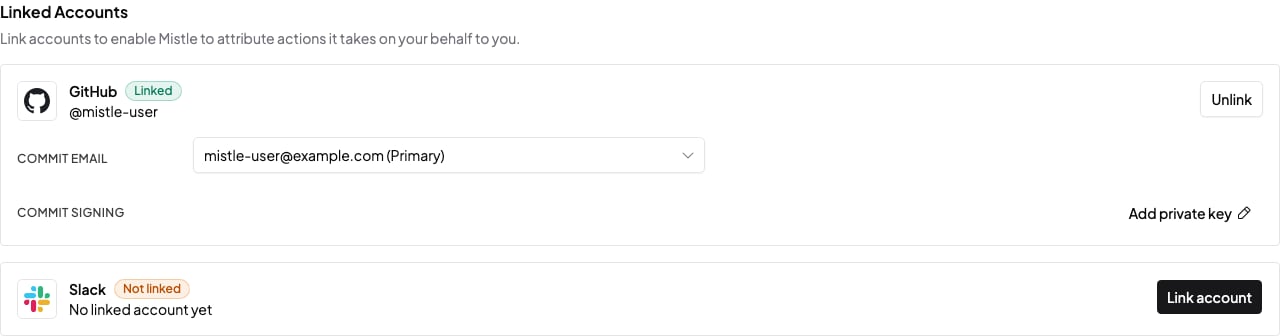
Each user links their own provider account from profile settings:- Open Settings.
- Go to Account > Profile.
- Find Linked Accounts.
- Select Link account for the provider.
- Complete the provider authorization flow.
View Linked Identities
Organization owners and admins can see linked identities from the same organization settings page:- Open Settings.
- Go to Organization > Identity Linking.
- Use the Users Linked column for the provider.
- Select the view action for that provider.
Next Steps
- Read Integrations for the provider connection model.
- Read GitHub or Slack for provider-specific identity-linking setup.
- Read Triggers to see how linked identities are used when events trigger agent work.